Table des matières
Access to Num-Pad
To access the Num-Pad:
- mouse: click [Num-Pad]
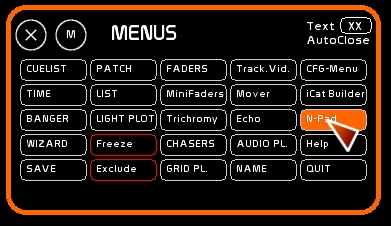
- keyboard: press [P]
Using the Num-Pad
Virtual Numerical keyboard
Num-Pad is designed to set channel levels with a touch screen or with a mouse. For the most part it replicates the numeric keypad on the keyboard.
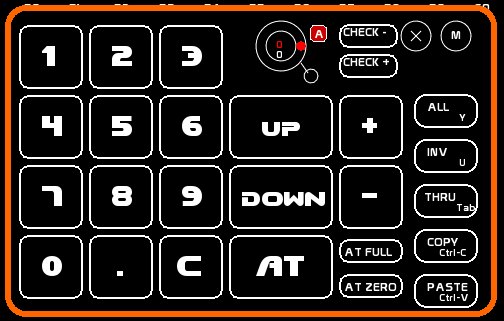
- [UP] and [DOWN] perform the same function as the mouse wheel, or level + and level -, changing the levels in 1% increments in percent mode, or 1 dmx step in 255 mode.
- [AT] is equivalent to [ENTER]
- [+] and [-] adds or subtracts a channel from the selection set.
- [.] enables you to create point cues (1.5 100.9 etc) or times (seeTime window)
- [ALL] selects all lighting channels, equivalent to pressing [Y].
- [INV] selects all lighting channels not selected, equivalent to pressing [U].
- [TO] enables you to call a series of channels, equivalent to pressing [tab]. Select the first channel, then click [TO] on the Num-Pad. [TO] will be highlighted. Now select the last channel of the selection.
- [COPY] copies all levels from the selected channels, equal to [Cntl-C]
- [PASTE] pastes the previously copied channels, equal to [Cntl-V]
For further details about selecting a channel, see Channel space
The selection set created in the Num-Pad appears in the feedback area of the screen.
Midi Assignment
Certain midi devices have numeric keys that send midi, such as the Evolution UC-33.
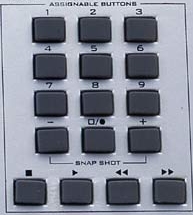
NumPad is completely assignable in midi.
See Midi Configuration and Midi Assignment.
Level Wheel
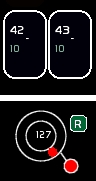
This wheel is specially created for midi devices, especially those with rotary encoders, like on a BCF or a UC-33.
This wheel sets the channel levels for selected channels both in stage and in Blind.
It has two modes:
- mode [A] for an Absolute level
- mode [R] for a Relative level
To select which mode the wheel is to be set to is done by clicking the wheel mode box, which toggles between [A] and [R].
Eventually you will be able to use this wheel with the mouse, but only in Absolute mode.
Absolute mode for an encoder like on the UC-33 and others, with physical stop points left and right
A slider, or a rotary knob has by default a start point, and an end point: minimum and maximum. In midi, 0 and 127. This limitation is physical for absolute controls.
If your midi device has fixed stop sliders or rotaries, you can only work in Absolute mode.
Channels selected will receive the level of the midi controller converted to a percent.
This level will replace the previous level of the channel(s).
Manually set a channel at 70% and by slightly touching your control you will transfer its level directly to the channel.
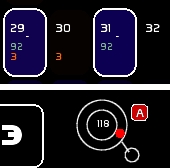
Here the channels are set at 92/100 (118/127 converted to a percent):
Relative mode for rotaries of the BCF/BCR and others that are endless rotary encoders
Certain devices have these endless controls.
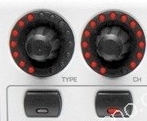
They deliver a signal that can be set inside of the midi device
- in absolute mode: fading is done from 0 to 127
- in relative mode: each turn to the left will send alternatively 127 then 126, and each turn to the right 1 then 2 value.
This happens instantly without fading.
To program a BCF2000 rotary in Relative mode ( manipulations inside the Behringer device ) :
- Make sure [EDIT] is held down and move the rotary that you want to edit
- the screen will show the number of the encoder (E1 if it is the first one)
- release the [EDIT] button
- move the rotary controlling [MODE] and choose [REL1]
- Be sure not to adjust other rotaries because in edit mode they are all accessible to change.
- Push [EDIT] again to get out of the editing mode.
- Finally, if your edit is functioning, push [STORE] two times to record inside the Behrinhger.
In White Cat, set the level wheel to relative mode:
Each channel selected will decrease or increase from one step, receiving the relative pulse. Relative mode produces the same effect as using the [UP] and [DOWN] arrow keys
Selecting a channel and setting it at 11% and then moving the rotary to the left will decrease the selected channels in 1% increments:
MIDI assignment to the level wheel
To assign a midi signal to the level wheel:
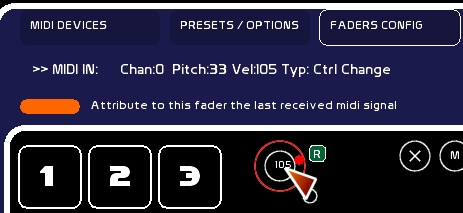
- select [MIDI CFG] tab inside [MENU CFG]
- check you are receiving a signal from your device
- check Solo in [Midi Affectations]
- move the rotary you are planning to use
- click level wheel in White Cat (when the mouse is over it, it should be outlined in red)
- close the [MIDI CFG]
MidiOut
This small circle enables you to send the level of the wheel to the Midi Out port.
