Table des matières
Trichromy / Quadrichromy window
This window enables you to work with additive color mixing on various channels:
- in trichromy, using channels for Red, Green, Blue
- in quadrichromy, adding a channel for Yellow
This module is based on red LEE 106, green LEE 124, blue LEE 119, and yellow LEE 102. In terms of number of spotlights, you'll need twice as many blue because transmission is so low.
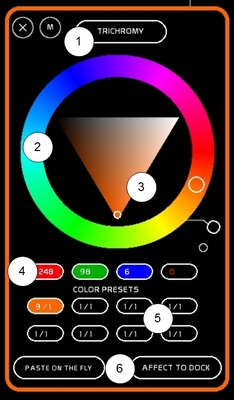
The Trichromy window is composed as follows (from top to bottom):
- a mode selector switching between trichromy/quadrichromy
- a hue ring
- a triangle for saturation and value of the color (sat/val triangle)
- 4 docks in which will be stored the channels dedicated to the colors (R G B Y). Levels outputted from the sat/val triangle are shown there.
- 8 color-presets, enabling you to have 8 trichromy systems working simultaneously. In each of those 8 presets is printed the number of the fader and the dock to which they are assigned.
- an affectation button to assign the output of a color preset to a dock
Calling Trichromy window
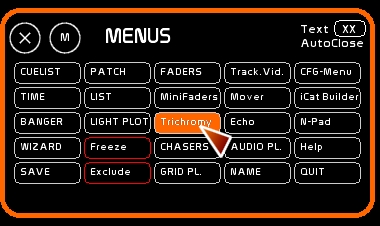
Click [Trichro] or press [F7]
How to use the Trichromy window: Step by step
Assignment of a color-preset to a Fader
- select first the color-preset you wish to work with
- click the mode in which this preset should work (RGB or RGBY) [TRICHROMY]
- click [AFFECT TO DOCK]
- click dock oval to assign this color-preset to it.
! Be aware that a dock that contains a color-preset is unlinked ( a clear or something else is recorded in place of ) it will appear in flashing color.
Assignment of channels to a color-preset
- select channels to assign as Red
- click [STORE] or press [F1]
- click the RED button to assign them
- confirm
Repeat these operations for Green and Blue .
! Use [MODIFY] to add or remove a channel from a color assignment: if the channel selected is already assigned inside, it will be removed. If it is not present, it will be added.
Using Hue ring and Sat/Val triangle
Moving around the hue wheel, you change the color inside the val/sat triangle.
RGBY levels are taken from the sat/val triangle and sent to the chosen color-preset.
The logical progression of this module is HUE TINT → SATURATION/VALUE → SPOTLIGHTS.
You can, through using the sat/val triangle, work in deep tints, as well as pastels very easily.
Midi assignment and midi loop back
The Hue wheel is assignable in midi.
Click the circle to enable midi-out of its value to be sent to a midi device (rotary knob).

For more information about midi and how to assign, see Midi Configuration and Midi Assignment
Visualization of the color independent of the Trichromy window
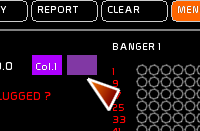
In the text feedback section of the screen (line 1) there are two rectangles that display the color of the active dock and the saturation and intensity of the active dock.
Also, the dock number of the active dock is displayed.