What to do when my DMX or Midi Skips
This may come about due to a worn or loose USB cable or human error. Unlike Schwartzpeter, you can disconnect/reconnect (hot) your hardware for White Cat without having the system crash. You do not need to restart White Cat to reset the connection.
Hot plugging your DMX interface:
- Go to the CGF Window
- Pick the DMX tab
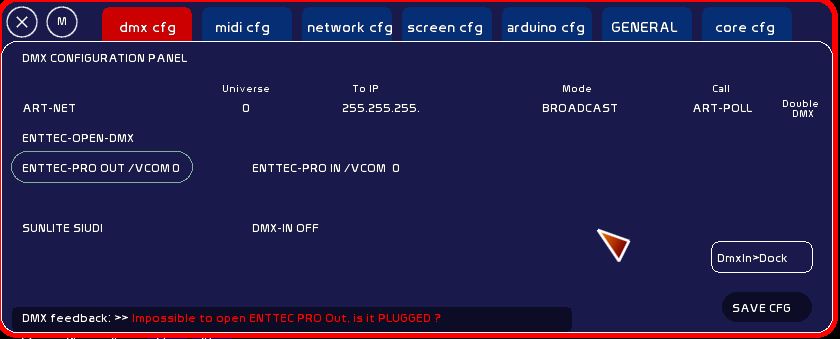
- Click on ArtNet to disconnect from Enttec Pro.
- Re-click the Enttec Pro
- Do not confuse the Enttec Pro with the Enttec Open: the drivers are of the same type but White Cat will freeze (in this case, when the interface is disconnected the freeze stops)
If you use the Double DMX outlet (Enttec Pro + ArtNet) to control the video:
- Do not forget to reset the Double DMX to the right of the ArtNet

If this doesn't Work (Still no green LED):
- physically disconnect the DMX interface, reconnect, wait a bit. And if Windows does not reconnect to it, repeat the operation described at the beginning of this paragraph.
Reconnect Hot to your Midi Control Surface
Sometimes with Windows, connecting midi can make it jump or skip. This problem is usually apparent on machines that have not been updated and disappears after the update. However, tired and worn USB ports can also cause a disconnection.
When you move your midi controls, if nothing changes in the feedback, no info type Chan: 0 Pitch: 56 Vel 127, If this happens during a performance, do not panic!
- Go to [CFG-Menu] tab> [Midi]> sub-tab [Devices].
Midi ports to the left (in orange) are MIDI inputs (signals coming to White Cat). Ports on the right in red are the midi outputs (White Cat sending to the midi interface).
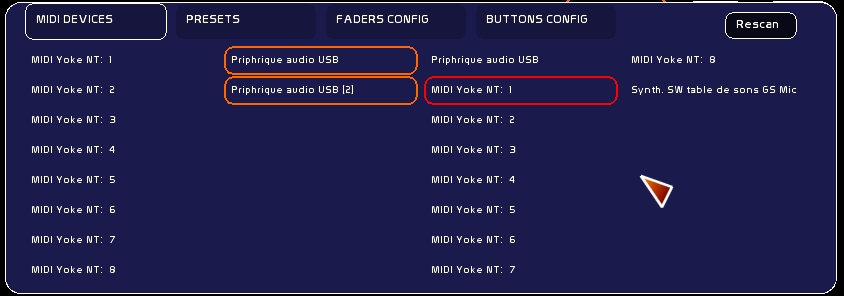
- What midi port is selected (some interfaces appear to have several midi ports)
- Deselect the midi port to your interface
- Click Re-scan
- Reselect the port for your midi interface

If it is still not working:
- Physically disconnect the interface
- Wait a second
- Reconnect the midi interface
- Repeat the procedure described above