Table des matières
Configuration of multiple software in art-net
Attention, wifi must be disconnected. White Cat connects to the first network card detected. If wifi is connected, the discussion will be on that network.
It is possible that during the various stages, especially after an address change in art-net within White Cat, that you will have to restart in order to reconfigure the art-net receiving server.
Configuration of the IP address of the network card used
You can only connect White Cat if the IP addresses are in the same family.
If the network card you use is 192.156.178.5, then sending an art-net signal to 2.255.255.255 will not work.
It makes sense then to set your art-net network cards in the address family of 2.x.x.x.
Configure the network card by doing the following:
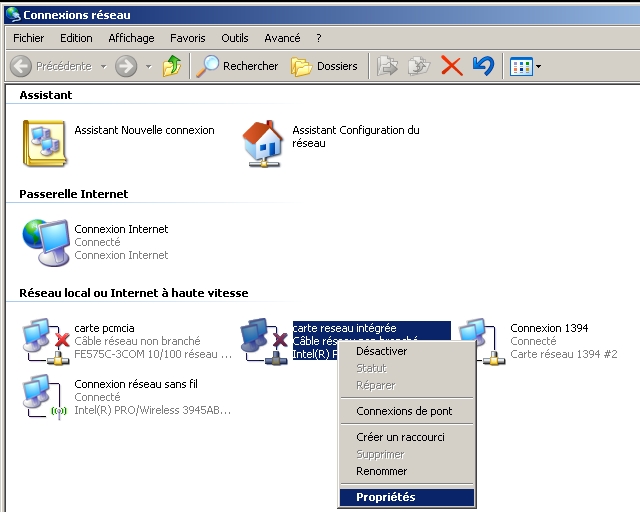
- Start Bar “Connections” Show all connections
- Right click the network card you are using and pick Properties
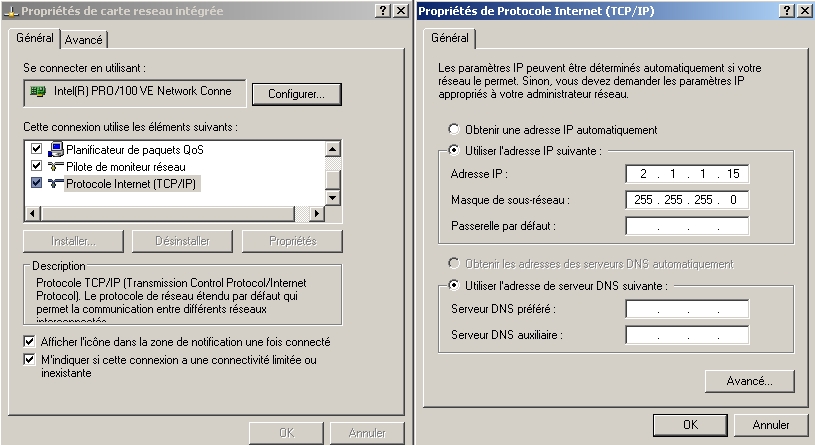
- Scroll down and select Internet Protocol (TCP-IP) and pick Properties
- Choose to specify a fixed IP
- Give the address a value of your choosing (2.1.1.15 in the example below)and use the subnet mask 255.255.255.0.
- You don't need to bother with the DNS (domain name server)
- click OK.
The different Scenarios
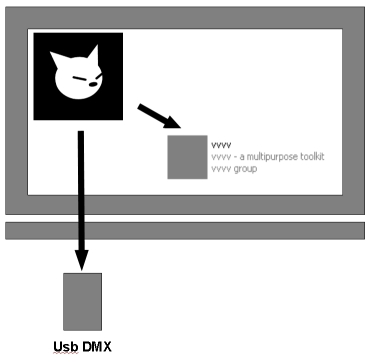
2 software programs on one machine
Example: Using art-net in a third party video software (VVVV, Arkaos, Freestyler).
| Art-Net IP address | state of ethernet card | State in the menus |
|---|---|---|
| 127.0.0.1 Unicast | Disabled | Sending data to Usb Dmx / Artnet Receiver Off |
| DoubleDMX option ON |
- This method uses a loopback address. No network card should be connected.
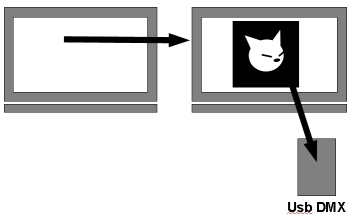
2 separate machines, Merging to usb-dmx
Example: Receiving in art-net of a third party software (VVVV, PureData, Max/NSP) being the manager of the sensors and processing of their values.
| Art-Net IP Address | State of the éthernet card | State in the menus |
|---|---|---|
| network adapter connecting the two computers | Connected | Sending data in Usb Dmx / Art-net Receiver ON |
2 separate machines, Merging art-net
Example: Receiving in art-net of a third party software (VVVV , PureData, Max/NSP) being the manager of the sensors and processing of their values.
In this case a hub is needed!
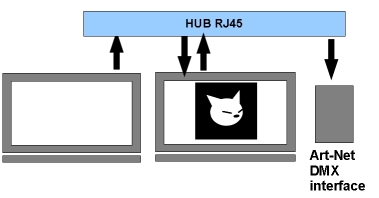
| IP Address | State of the éthernet card | State in the menus |
|---|---|---|
| Network Card | Connected | Sending data en Art-Net / Art-net Receiver ON |
- The IP addresses of the network cards on which you are connected must be of the same IP fanily as the card dmx art-net : for example, 2.1.1.x
- The third party software should not transmit on the same universe as White Cat. One would prefer that White Cat be on universe 0, and the other software on universe 1. The dmx network card listens to universe 0. White Cat listens to universe 1.