Table des matières
Grand Master and dmx buffers in White Cat
Grand Master
Grand Master is a fader that affects all channel levels sent to the dmx card.
Its location in the workspace is at the top right of the screen, and for notebooks limited to a 1024×600 resolution, it is located in Fader space, before the 1st fader and also after the 48th fader.
From version 0.7.6.4 onward, the Grand Master is lockable (On or off).
This is especially for work with VVVV in art-net, as certain channels are used as preset positions. The preset system will not work if the Grand Master is not at full: channel 61, remote-controlling which file needs to be played, will never select the correct file if the dmx value is not correct (because it has been changed by the position of the Grand Master).
To Lock/Unlock the Grand Master, check/uncheck the On/Off in [CFG Menu] > General
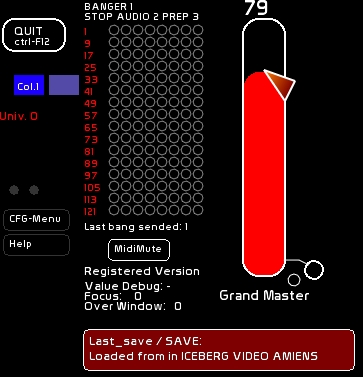
Midi Assignment of the Grand Master
Grand Master is remote-controllable in midi:
- click [CFG Menu]
- Select [Midi] > [Midi Affectation]
- select [Affect solo]
- move your midi fader
- click the Grand Master
For more information about midi devices and principles: Midi Configuration and Midi Assignments
By clicking on the hanging circle, you will enable a midi out signal specifying the level of the Grand Master (for operating motorized midi devices).
DMX Buffers
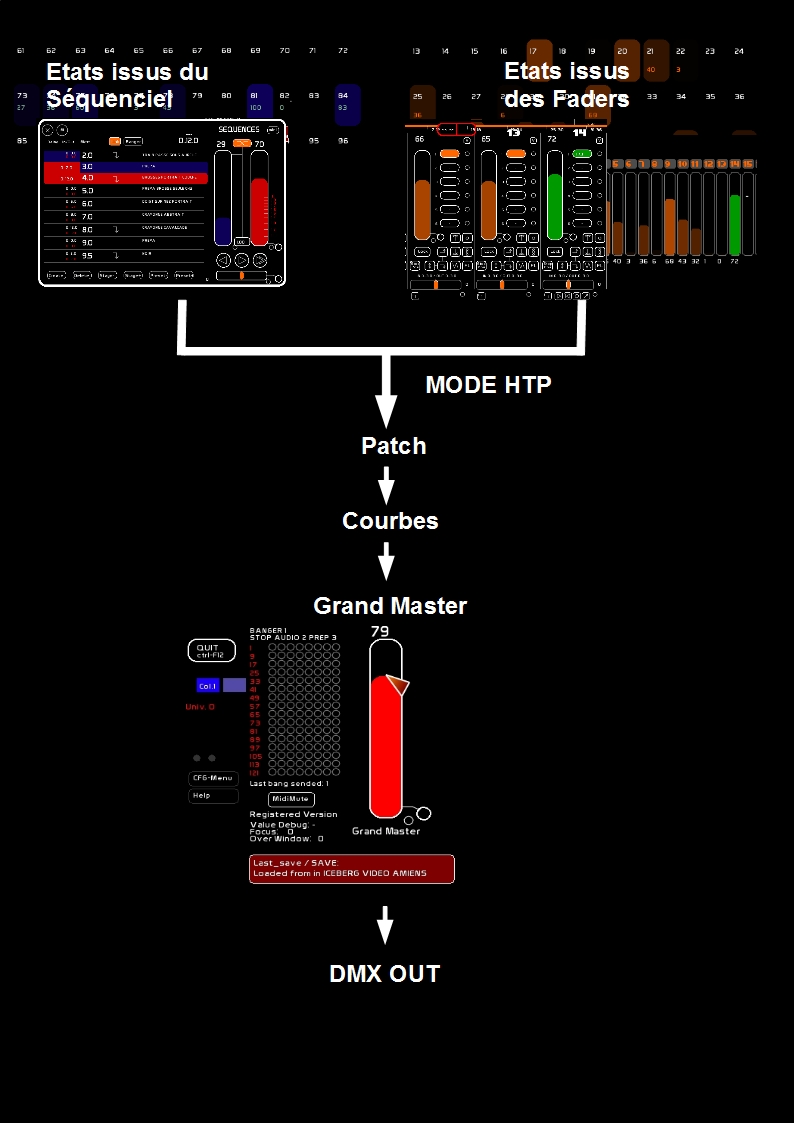
Moving the Grand Master slider will not change the output levels displayed in Channel space, but it will change the raw DMX signal sent to the interface.
This Raw DMX is the result of combining
- Buffer coming from CueList (channels levels printed in blue)
- Buffer coming from Faders (channels levels printed in orange)
They are merged using the HTP protocol (Highest Takes Precedence): where the highest level found is taken.
Then the signal goes through the patch routing, where it is affected by curves.
Then the final result is mastered by the Grand Master.