Table des matières
NetWork configuration
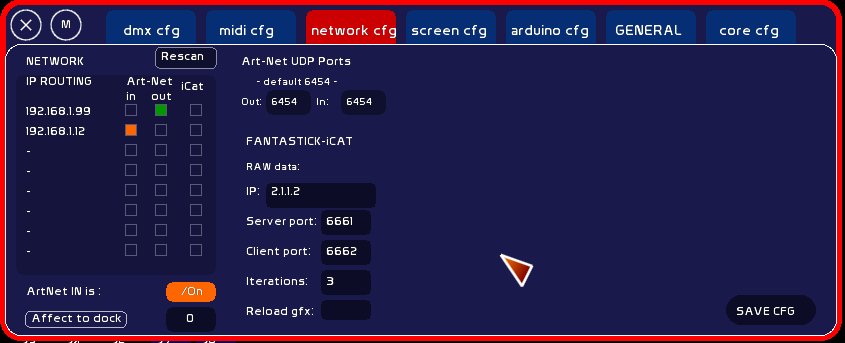
Version 0.8.3: A significant number of improvements were made to the network configuration tab.
Do not forget to click [SAVE CFG] in order to save the network settings.
IP ROUTING
This list allows you to see which adapters are connected to a network. To the left of each is the IP address that White Cat can use:
- to receive Artnet
- to send Artnet
- for communication with iCat
You can have three types of communication on separate cards or on the same card.
ArtNet
As already mentioned in the DMX configuration section, you will have already entered the IP address of your Enttec Ode or other Artnet interface box and the subnet and universe that it transmits on (usually 0-0).
Warning: So be sure that you have a network adapter set to that IP family on your machine. The DMX Configuration tab indicates where to send the data (ie the IP of the Ode or other Artnet interface box). It does not define by what route the data will be sent. That is the IP routing, which is on the Network tab as shown above.
You can connect/disconnect the fly to the network adapter of your choice (WiFi/RJ45 and PCMCIA/USB). When you connect to a network adapter on this menu, you can receive an Artnet signal from this IP card and from this IP family.
For the Artnet program to work, it is necessary that the Artnet IP defined in the configuration (CFG DMX) be in the same IP family as the one White Cat is logged onto (eg if the Artnet signal is sent to 192.168.1.50, then you should be connected to a network adapter with an IP of 192.168.1.X).
UDP ports
Default UDP port is ArtNet port 6454. DMX interfaces, and most of their software transmit or receive information through this port. For example, if the OUT port for White Cat is not 6454, then the ENTTEC ODE will receive nothing as it listens to the port (6454) specified by the Artnet protocol.
What you need to understand is that on one machine, only one application can connect to a UDP port IN and only one application can connect to a UDP port OUT.
Control is taken by these applications. As with a USB port, if you connect your dmx interface that you use with White Cat, and you try to start Schwarztpeter, it will not work. White Cat has taken control. A port IN> one application, OUT port> one application.
If you open a software program like VVVV with a DMX node (Arnet receiver) and then you open White Cat with server mode enabled (ON receiving Art-Net), the VVVV node will disappear because White Cat takes over the UDP port IN.
This problem with ports was resolved on the ChamSys MagicQ software by letting you specify on what port to transmit and what port to receive, thus allowing the coexistence of several Artnet applications on the same machine (ie 6454 to send and 6453 to receive).
Assignment to the dock ArtNet In
You can receive up to 4 universes of ArtNet in White Cat. This choice is made from the sixteen universes of subnet 0 numbered 0-15. To assign an ArtNet universe to a dock:
- type the number of the universe (0-15)
- click [Affect to dock]
- click the dock to which you want to assign this dynamic content
- set ArtNet IN to ON. This will open the ArtNet server on the specified port
When you quit White Cat, the most recent configuration is saved, so that it is re-opened at startup.
Fantastick iCat Builder
Remote iPhone/iPad: here you define what address to send the data to fantastick and which UDP ports to use. See Fantastick-iCat