Table des matières
General Configuration
This menu is there to adjust certain settings in White Cat.
When a parameter doesn't need any entry, but just a click to toggle its state, it is written “/”. Otherwise you will type your number, then click the box of the parameter to change it.
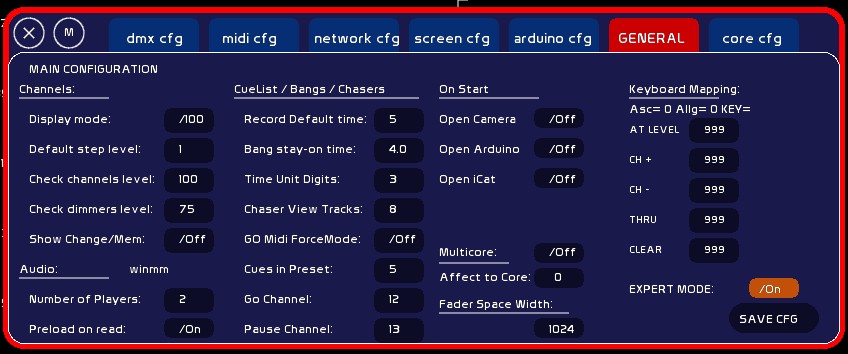
Channels options
Display Mode
Toggle /100 (percent) or /255 (DMX) view .
Default Step Level
Value of [UP/DOWN ARROWS] and third button mouse wheel.
Check Channel Level
Value of channel called by [CTRL][LEFT/RIGHT ARROWS]. To protect 2kw and 5kw bulbs from check at 100%.
Check Dimmer Level
Value of dimmer called by [SHIFT][LEFT/RIGHT ARROWS]. To protect 2kw and 5kw bulbs from check at 100%.
Show Change/Mem
Makes channels that have been modified from their recorded value in the memory onstage or in preset to flash
Audio Options
Number of Players
Number of players to be seen in the window. This is only a visual option. Players not being shown still exist and may still be manipulated from a banger and by midi triggering.
Preload on read
This is the recommended mode: loaded file is preloaded in memory. If you want to read from HDD, set it to Off.
Memories/Banger/Chasers Options
Record default time
Default time IN and Out when recording a memory, expressed in seconds.
Bang stay-on time
Number of seconds a Banger stays accessible from the mouse to go, go back. This is done from the general visual panel of the 127 bangers. It enables you to roll back a banger while rehearsing.
Time Unit Digits
Number of digits after the point for printing Time Unit information in Chasers.
Go Midi ForceMode
On/Off ForceMode in Midi for the GO.
If On, and a crossfade is running, pressing Midi Key for the Go will not trigger a pause, but a Jump. Only for midi, not concerning keyboard or arduino.
Misc options
Grand Master On/Off Move
When set to OFF, the grandmaster can't be manipulated by mouse, midi, or iCat. This is done especially for video remote controlling and moving heads, to avoid the preset being changed by the grandmaster.
MultiCore
Set White Cat to a dedicated core. You should also set the app Process.exe (folder /utils) with administrator rights.
On Start
Enables you to connect to the following material on start, automatically:
for video tracking
Arduino
It searches for the first COM port and logs onto it. Do not trigger this if you are working with FTDII devices such as enttec open.
iCat
Open automatically a server on the IP recorded .
Keyboard Mapping
Certain users are experiencing troubles with certain keys on their keyboard. Especially with Enter * / + = and -. There will be a module for keyboard mapping later. Actually, to assign to one of the problematic function the non working key you need to read the ascii input, and to set it in front of the function you want to assign to.
- press problematic key
- read value in front of Asc=
- type this value
- Click function key to assign to
If the ascii value is greater than 0 it will be ok. To unassign, set the value as 999.