Table des matières
DMX Configuration
In the actual beta release, the following DMX interfaces are supported:
- Art-Net protocol: ( ethernet )
- and of course other “art-net compliant devices”
- ENTTEC OPEN DMX ( usb)
- ENTTEC PRO ( usb)et ENTTEC PRO MK2 (usb)
From version 0.7.6 onward, if you want to simultaneously send data with your usb-dmx dongle plus art-net, it is possible by activating the DoubleDmx option. From version 0.8.4, Very Slow Velleman and discontinueted USBDMX512ONLINE.NET devices are no longer more supported.
Installing DMX device and drivers
To communicate between White Cat and your usb based DMX device, you need to have installed the drivers of the device on your computer.
It is recommended, once the drivers are installed, that you reboot your computer.
It is possible that you may encounter on Vista or Windows 7 troubles installing the drivers, such as:
- installers blocked for security reasons
- access to the internet denied for your installation or update
Information is given here “as is”, and we are not trying to resolve troubles you may have connecting to the internet, to update your drivers or to free your windows from aggressive firewalls. Dealing with Windows is up to you.
Enttec ODE
This device is ethernet based. There is no need to install drivers, except if you need to add an ethernet card to your computer. It will come with a default IP address (like 192.168.0.1) and will send (rather than receive) on one of 16 subnets and on one of sixteen universes on that subnet (usually subnet 0, universe 0). It will also come with a utility program to change these defaults if you so desire.
This device is plugged in using a cable with an RJ45 connector. This cable may be plugged from the device directly to your computer, or thru a LAN Hub RJ45, or a Wifi router with an RJ45 connection.
To communicate with it, you will need to have a network adapter set to the same IP address family as your DMX interface box. You may set the parameters of your ethernet adapter manually, or use the Enttec's NMU manager that will help you assign the same ethernet family IP address as your network adapter.
Generally in Art-Net protocol, we would prefer to use the IP addresses in range of 2.255.255. But nothing is wrong if you want to use the 192.168.1.X family address (I have done a lot of shows with 2 or 3 computers in the network all being based on 192.168.1.x family).
The manual way to set your network adapter is done from Windows:
- go to the Windows Control panel
- click [Network connections and internet] > [network connections]
- selection the desired socket adapter then right click > properties
- select in the list TCP-IP > click properties
- choose if you want to set the address in a permanent way, or use the auto-detect method
- to specify the address permanently: set the IP: 2.255.255.1 for example / set the subnet mask to 255.255.255.0 / default gateway to 2.255.255.1 / DNS to nothing
- click apply and quit this dialog box.
Enttec OPEN
You will need to install the driver to be connected to internet. The installer will download the latest version of the FTDII driver.
It is possible to avoid it also, by using the driver furnished in White Cat drivers/folder. This is an old driver, which works nicely in XP, provided in case an emergency installation is required.
- connect the Enttec OPEN
- a dialog window will appear to search for the driver
- select “search manually for the driver” and point to the folder: WhiteCat/Drivers/Enttec Open/
- normally you should do this 2 times
- reboot your computer
Enttec PRO
With Enttec PRO you can download and install automatically the driver, or use the installer furnished by ENTTEC. White Cat uses the VCOM one, and not the FTDI2XX installer. The communication will not be done with it but with VCOM. The VCOM installer is also donwloadable from Enttec's site.
- open WhiteCat/Drivers/EnttecPro/
- launch Pro_VCOM_Setup.exe
- plug in Enttec PRO
- a window will pop up
- select “search manually for the driver” point to this folder: C:/VCOM/
- normally you should point to it TWICE.
- reboot computer
Important: Enttec Open & Pro
On certain computers plugging into usb ports other than the one used for installation will ask you to point again to the correct directory.
Some USB ports do not deliver enough power to power the electrical interface. We can solve this problem through a USB HUB . It will prevent plugging too many accessories on the hub (keyboard, mouse, joystick etc …). If this problem is detected during the driver installation, the installation procedure may be performed ONCE instead of twice.
L'Enttec PRO MK2
For restitution of one DMX universe that works like Enttec PRO. These are the same drivers. + However, it will be necessary for any installation on a single machine, absolutely ENABLE VIRTUAL COM PORT (VCP). + + Once installed the drivers, it will: + Go to Control Panel + Open Device Manager + Select USB SERIAL PORT in Universal Serial Bus Controller + Right-click on it and ask for properties + Go to the Advanced tab + Check load VCP + Click Ok + + Vidéo Enttec + + At the moment only the restitution DMX is carried out in White Cat. + + By August 2013, the DMX IN function and the second DMX universe will be accessible.
SUNLITE SIUDI-8C
White Cat Sunlite integration is done on the Sunlite Suite 2 (February 2010) driver.
Normally those drivers and dll's are retro compatible to devices 5C and 6C.
In case of troubles, please see the Nicolaudie team.
jkkk
DMX configuration Menu
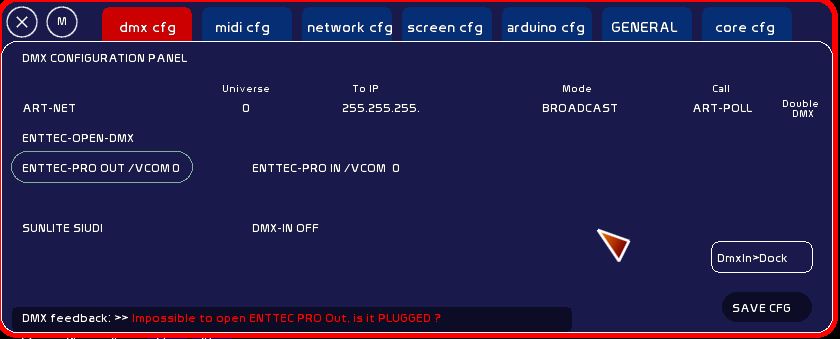
Click [DMX CFG].
The choice of the device will be done by clicking on its name on the left side .
When you select a device, you close the previous device selected, and ask White Cat to open communication with the new device. Unlike Schwartzpeter, you can replug a device on the fly, and reconnect it from inside White Cat.
Up on the right you can see the DMX refreshment rate (50 x sec) and the dmx IN refreshment rate (30 fps).
On the bottom of the window, in red, you have the device feedback.
By clicking [Save] on the right bottom corner, you will record as the default the dmx device you want, for the next opening of White Cat. Saving this parameter is not part of the General show saving. It has to be done separately.
Each device has its own specs, so actions on them are different.
ART-NET
DMX data is sent over the ethernet network.
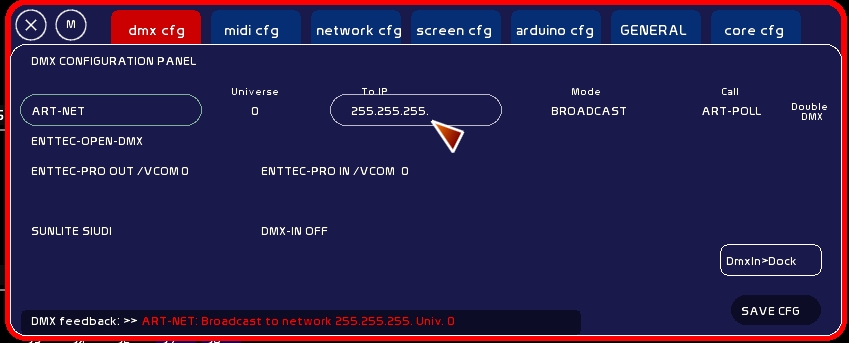
You can edit:
- DMX universe you are sending
Click dmx universe box, type Universe number, click again
- IP adress to send to (in general 2.255.255.255 ).
Click IP box, type IP, click again
- type of sending:
- broadcast (all computers in IP range 2.1.1.*, from 0 to 254 will receive data )
- unicast (for only one computer, aka 2.1.1.3)
If you click [ART-POLL] you will send on the network a query for art-net compliant devices and programs. They should reply to it and give you their addresses.
DoubleDMX
(0.7.6)
DoubleDmx allows you to work simultaneously with a USB DMX , and send art-net data on the network, to other software that is art-net compliant (especially in video with VVVV or Arkaos).

To set Art-Net:
- select Art-Net
- if you want to send art-net data to the same computer, choose IP 127.0.0.1, Unicast and deactivate in [Network CFG] art-net reception.
Be aware: on Vista and Windows 7, 127.0.0.1 will not work* (IPv4). You will need to enter …1 or ..1. ( config IPv6) in Broadcast to access the virtual Host port. If you are on a closed network, you may also send to 255.255.255.255** and so access all IPs without searching the right address.
To trigger DoubleDmx:
- keep your USB DMX device selected
- click DoubleDmx
- click [Save CFG] to save the DoubleDMX behaviour
ENTTEC PRO
You may have 2 enttec PRO's plugged on your computer.
First device detected by windows will be the DMX OUT.
Second device will be DMX IN.

It is recommended that you plug your devices one after one, slowly, after the computer is well started.
The DMX-IN will be assigned to the dock of a fader.
You can also work with different usb devices, Pro being dedicated to receive external DMX.
SUNLITE SUIDI 8C and previous
This device is able to receive and transmit DMX at same time. It is in its category the best performer and the fastest, with its triple buffer entry system. A good toy, expensive, but very nice.
To activate DMX-IN, click [DMX-IN OFF] > [DMX-IN ON].

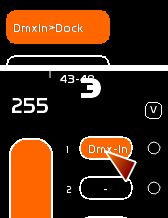
Click [Dmx In>Dock] to be in DMX In assignment mode. Click the dock of a fader.
Retro-compatibility of drivers should normally let you use previous DASHARD devices such as: SIUDI 5, 6 and 7 (dashard2006.dll).
When a SIUDI device is chosen, White Cat displays its firmware version, serial number and which interface it is (ie 5C, 6C, or 8C).
Dmx-IN how does it work ?
Dmx device selected in dmxIN receives a signal. This one is buffered in a specific buffer.
You have to attribute this buffer to the dock of a fader, to send on stage the received channels.
Goal :
- using a manual board inside White Cat: creation with faders' memories, playing live, let access to other to data easily , etc…
- merge output of another board and specific features of White Cat.
A point about dmx devices
For just sending a good data signal, I would strongly recommend the Enttec Pro.
For a simultaneous DMX In/Out: SIUDI 8C from Sunlite is really great. 2 Enttec Pro's, one for In, the other for Out, seems to work well also, but I need to optimize my code.
For multi-software work (video on ARKAOS or VVVV ), Art-Net is really great and much faster than classical DMX. Enttec's ODE has a good price/performances ratio.
And finally, Enttec Open is of course suitable. Many users are just starting to control lights with a PC and want to try it out with these low-cost interface. Its not opto-isolated and will not protect your computer from an electrical surge (coming generally from the dimmers thru the grounding cable). For restitution of one DMX universe works like Enttec PRO. These are the same drivers.
DMX Interfaces, arduino and elbow grease
With a little patience and very little money, you can make your Open Enttec: just a “Arduino 2009” or “nano” (between 20 and 35 euros) and a MAX485 (5.5 euro) to transmit DMX. For even smaller budgets, buying a TTL serial interface (4 to 15 euros) to program the Arduino and using FTDII driver also allows transmission of DMX. The MAX485 is added to the symmetrical signal. It works just worry about small dmx systems.
When you turn around much, I recommended when even being on Enttec Pro pretty indestructible …