Table of Contents
Core Configuration
WhiteCat is much more than just a cuelist, and the background calculations are substantial, even for lighting:
- 1 cuelist buffer of 512 channels
- 48 * 7 buffers of 512 channels for faders
- 1 buffer of 512 channels for video tracking
- 8 buffers of 512 channels for trichromy
- 128 * 24 buffers of 512 channels for chasers
- 4 buffers of 512 channels for grid players
- 4 macros per channel
The Core Configuration window allows you to lighten the calculations for low-end machines.
You can customize the general options, or simply disable calculations by turning off selected buffers:
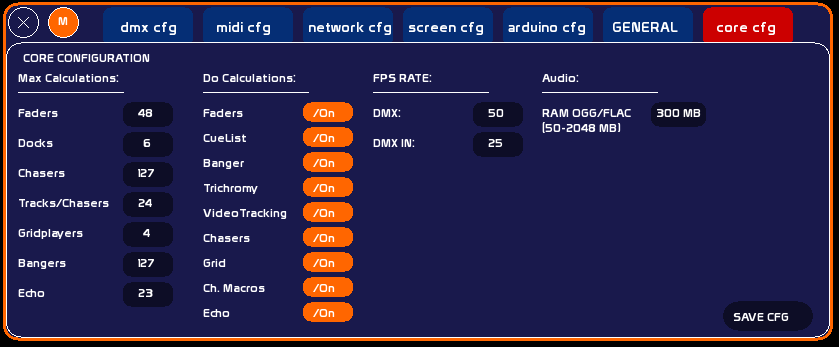
Max. Calculations
When enabled, defines the maximum number of:
- Faders (48)
- Docks per fader (6)
- Chasers (127)
- Tracks per chaser (24)
- GridPlayers (4)
- Bangers (127)
Do Calculations
Enable or disable calculations for:
- faders
- cuelist
- bangers
- trichromy
- video tracking
- chasers
- gridplayers
- channel macros
Set to Off, the buffer calculations and all functions derived from that family (LFO, crossfade, chaser time, etc.) are removed from the render.
All these options are saved in the /user folder, file config_core.txt.
Be aware: disabling CueList locks faders in direct channel mode.
FPS rate
FPS stands for Frames Per Second: the number of times an action is performed per second.
In this column you can modify:
DMX rate
- The FPS of DMX output: you can set it from 1/50th to 1/100th of a second (minimum 1/40th for a "smooth" signal). Why 1/100th? Synchronisation needs and hardware considerations (LEDs).
- The FPS of DMX IN: from 1/25th to 1/50th.
Audio
.ogg and .flac files are fully loaded into RAM when added to a player. This mechanism guarantees smooth playback, with no skips or decoding latency, even in CUE or loop mode. .wav and .mp3 files are not affected: they use their own loading mechanisms.
If an OGG or FLAC file exceeds the configured limit, it is played in degraded mode — playback is still possible but may show irregularities (less precise repositioning, slight startup latency).In this column you can modify:
RAM ogg/flac
- Range: 50 to 2048 MB
- Default value: 300 MB
- Enter the value in the field, then click it to confirm.
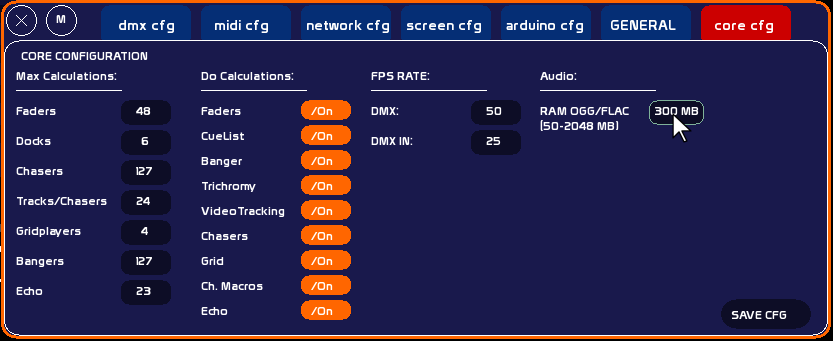
The table below gives an approximate estimate of RAM usage depending on duration and format:
| Duration | OGG ~128 kbps | OGG ~256 kbps | FLAC stereo 44.1 kHz 16 bit | FLAC stereo 96 kHz 24 bit |
|---|---|---|---|---|
| 1 min | ~1 MB | ~2 MB | ~6 MB | ~18 MB |
| 5 min | ~5 MB | ~10 MB | ~29 MB | ~88 MB |
| 10 min | ~9 MB | ~19 MB | ~59 MB | ~176 MB |
| 30 min | ~28 MB | ~56 MB | ~176 MB | ~528 MB ⚠ |
| 1 hour | ~57 MB | ~113 MB | ~352 MB ⚠ | ~1056 MB ⚠ |
| 2 hours | ~113 MB | ~225 MB | ~704 MB ⚠ | ~2112 MB ⚠ |
⚠ = exceeds the default 300 MB limit → playback in degraded mode. Increase the RAM limit if needed.
Tips: increase the limit if your OGG/FLAC files are large and the machine has enough RAM. Reduce it on low-memory configurations.