Table des matières
Cleaning the Com Ports in Windows
On a machine that often uses different hardware peripherals, sometimes there are problems with the automatic assignment of Com Ports.
We're talking about the detection of hardware that uses serial communication like:
- DMX interfaces based on chipset FTDII (Enttec Pro/Open/Vinc's USB-DMX512.Online.net)
- Arduino ( 2009 and before)
- Other peripherals using using serial communication
Windows will assign a fixed COM port.
The numbering of these COM ports starts at 3 (included), 1 and 2 are reserved for the modem. The problem is that if we exceed the limit of 10 com ports, which is a real limit for some software like White Cat or some hardware like Jeenode, then the device will no longer be accessible.
Arduino IDE under COM ports will appear, while only the arduino is connected. These COM ports are assigned permanently so it can be traces from some previous installation.
There are a couple of ways to deal with this.
Replace the Assignment of the Device:
This is the solution to use in an emergency:
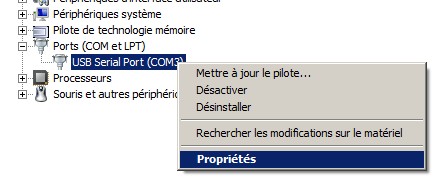
- Go to the Device Manager, right-click on My Computer > Properties > Hardware > Device Manager
- Select the Com Port category, right-click > Properties:
- Go to the Port Setting tab
- Click Advanced
- Select a different Com port from the list that has not been assigned yet and whose number is below 10.
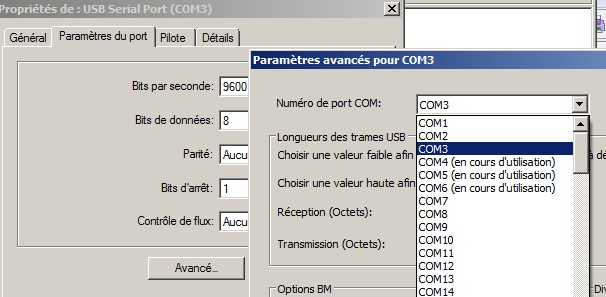
Note that in this screenshot, I have used 3 ports, 4 and 5 are assigned to other devices that are not plugged into the machine (DMX card and UNO). They are listed as being in use even though they are not connected: this is the problem with the allocation of fixed windows.
Cleaning the Ports Used
In the Device Manager window, click on the View menu and pick “Show hidden devices”
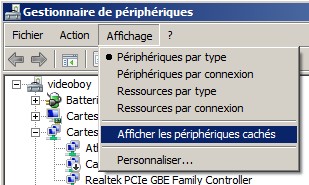
- Click each device in the section and delete the COM PORT (from 3 onward). When you have internet access, you may need to reinstall the latest driver.
- Restart Windows
- Connect your interface box, which will now receive a new com port (3) or something else near the beginning of the list.
For XP, follow this procedure for displaying the hidden devices: http://support.microsoft.com/kb/315539